Subscribe For Free Updates!

We'll not spam mate! We promise.

Showing posts with label business. Show all posts

Sunday, 7 September 2014

An overall review on Asus Zenfone 5


Asus Zenfone 5 is a superb phone,a product by Asus company and is a great budget phone with price ranging from 10000 rupees (8 GB) and 12999 rupees (16 GB)

It's specifications are:-

  1. 1.7ghz  clocking dual core intel atom processor with hyperthreading technology
  2. 2 GB RAM
  3. 5 inches HD screen with 10 point multitouch
  4. 8 GB/16 GB internal memory
  5. SD card slot
  6. Dual micro SIM slots
  7. 2110 mAh battery
  8. 3G support
  9. 8 MP rear camera and 2 MP  front camera with pixelmaster technology
  10. Gorilla glass 3 protection on screen
  11. Android jellybean OS with KitKat update coming soon.


Now coming to its pros and cons

Pros:-

  1. Great multitasking experience with 2 GB RAM.
  2. Great gaming experience with intel atom processor and it's hyperthreading technology.
  3. Superb Asus customized UI called the ZenUI, which is quite user-friendly and awesome looking.
  4. Crisp HD display makes display look superb.
  5. The glove mode feature which increases the sensitivity of screen and makes you able to type and use even by using a glove.
  6. Nice camera with superb feature like time rewind, low light mode, beautification, HDR, gif.animation, selfie mode, miniature,etc.
  7. Slim and quite light weight phone.
  8. There are many Asus service centres that can provide quick service unlike moto g where you cannot find  its service centres.
  9. It comes with gorilla glass 3 protection making it rough and tough.
  10. Very low price.
  11. A lot of inbuilt apps with superb uses.
Cons:-
  1. Low battery is the most problematic part of the phone, the battery drains quickly within 2-3 hours of usage of heavy games.
  2. No backlit buttons so makes it difficult to see them in dark.
  3. Speaker is on the lower end of back cover which mostly gets covered by hand and makes it difficult to hear.
  4. It's accessories are available only at Asus shops and Flipkart.

So overall  it's a great budget phone with specifications close to the phones ranging from 20000 rupees priced phones  and definitely worth buying.

Wednesday, 20 August 2014

MOTO 360 May Be Launched On Sept 4.!!!!

Moto 360 may be launched on Sept 4 2014
Motorola has been teasing its Moto 360 smartwatch for sometime.It will have a optical heart rate monitor, a pedometer and will be waterproof up to 3.3 meters with for 30 mins. The watch will have a stainless steel casing and a plastic back along with a horween leather band and a metal buckle closure.
Sleek & Compact

As we near the official release of the Moto 360 next week, speculation and parsing of the little information we have has gone rampant. While we don't know a whole lot about the watch — even though we've held it in our own hands — we do know that the big sore spot for many is the so-called "black...


Friday, 8 August 2014

Samsung still the leader in the US

Samsung still the leader in the US mobile phone market: Counterpoint Research

Samsung still retains a 36 per cent share of the US smartphone market, latest data from Counterpoint Research shows.

It also led the overall US mobile phone market with a 37% share.

Thursday, 7 August 2014

iPhone 6 Is Here...!!! Get To Known IT...!!!!!!!!

Finally, according to the ever-more aligning rumor mill, Apple is set to launch the iPhone 6 on 9th September, which makes sense given its past record of release dates. This means all will be revealed in a month’s time.

So, nearly 8 months on, am I still excited and if so by what new features? Firstly it’s still not clear whether we’ll see both the suspected 4.7in and 5.5in models on launch day but I strongly suspect the larger ‘phablet’ model won’t be available from the outset. It’s likely to be hideously expensive and sales could well suffer as a result.
The iPhone 5C’s sales took a hit but for the opposite reason – the iPhone 5S wasn’t much more expensive so it made sense to opt for it instead. Likewise the 4.7in iPhone 6 already offers a larger screen so why go for something what many will feel is obtrusively large?
iphone 6

The proposed 4.7in and 5.5in versions of the iPhone 6

A larger screen

However, the larger screens are very welcome indeed for me and the 4.7in model is most likely the model I will eventually retire my iPhone 5 to own. This is for a number of reasons. Typing is more accurate for one – like it or not, a larger display means a larger keyboard that’s easier to use. I used a 4.7in Android-based smartphone recently and the difference the larger screen made to my iPhone 5 was immediately obvious when typing. I made fewer mistakes and could type faster too.
 The larger screen also makes viewing everything from websites to videos a much more immersive experience. You don’t have to pinch and zoom as often and setting your device down and watching videos often means plenty of squinting with the iPhone 5, unless you’re holding it to your face.
A wide display and form factor
While many iPhone 5/5s owners like the narrow screen and its ability to be operated fairly completely using just one hand, this aspect ratio doesn’t lend itself particularly well in other areas of ergonomics. The competition has had much wider, fuller screens for many generations and for the large-handed, the iPhone 5S can feel very small and not really up to the task of being a fully-featured smartphone. A wider display and handset could make it easier to use although it’s likely to put an end to one-handed use for most people.
4
The battery inside the iPhone 5 is usually depleted within a day of heavy use.

Better battery life

The battery in the 4.7in iPhone 6 is also looking likely to be a 2,100mAh model – a higher capacity than has been reported till now. This would mean it has over 45% more capacity over that in the iPhone 5S. Now, the screen in the iPhone 6 will undoubtedly be larger and draw more power as a result but the move from 4in to 4.7in will still mean there’s extra capacity here in addition to what will likely be be a more power-efficient processor.
Better battery life is always welcome in a smartphone and Apple’s devices have often languished at the bottom of the pile when it comes to time away from a charger. In fact, I’m actually hoping the renders and cases we’ve seen are actually not a true representation as they do appear exceptionally thin – I’d rather have a bigger battery if I’m honest. Even so, even a 10% increase in battery life would make the iPhone 6 much more competitive.
iOS 8
One reason why Apple has stuck with its screen size for so long is the success of its iOS operating system. Introduced with the original iPhone, it nailed things design-wise at a time when the competition were still using styluses or had horrid touch screens. Now, though, who doesn’t have capacitive touch screens and large app icons?
iOS 8 could represent the biggest shift in OS design since that initial launch, as Apple has to deal with the larger screen real-estate and make all our favourite features work just as well as they do on an iPhone 5S. While iOS obviously runs well on both sizes of iPad, a smartphone puts the magnifying glass on this much more intently. It will be particularly interesting to see how things flow on the larger iPhone 6 too.


Friday, 4 July 2014

How To Convert Song To Ringtone (Android)

Wanna set your favourite song
 as your ringtone here it is ...!!!!!!


- First Download Ringdroid from playstore :- First Download Ringdroid from playstore :Here
- Open it and add the song that you want make it as Ringtone.
- Click on it. This will break the song.Now choose the part of area in song that you want to use it as ringtone.
- Click the Disk icon to Save it.Now a window will popup asking you to whether Save this a Default Ringtone to your Phone or for Specific Contact.
Choose your favorable and that’s it you are Done!
- Open it and add the song that you want make it as Ringtone.
- Click on it. This will break the song.Now choose the part of area in song that you want to use it as ringtone.
- Click the Disk icon to Save it.Now a window will popup asking you to whether Save this a Default Ringtone to your Phone or for Specific Contact.
Choose your favorable and that’s it you are Done!

Tuesday, 13 May 2014

Windows 8 Security Tips : Protect Your New Windows 8

Whether in Work or Home, sometimes you need to protect your PC running Windows 8 from being hacked or used by someone else. It's truly hard to do that while you are away from your Computer, but it's easy to apply some security tricks to your Windows 8 and feel safe & secure while you are not in front of your computer. Here is a List of Top Windows 8 Security Tricks that you have to apply to your computer in order to make it more protected.

#1- Know Who Used your Computer


With this trick you are able to know who used your computer in your absence. Event Viewer is a built in Windows feature also available on Windows 8, the Event Log is able to record any Login that happened on your computer with saving the Time and Date of the Login and the Session that have been opened. You'll also be able to reveal who tried to access your user account (wrong password entered). Here's the tutorial on How to see the Event Log on Windows 8. 
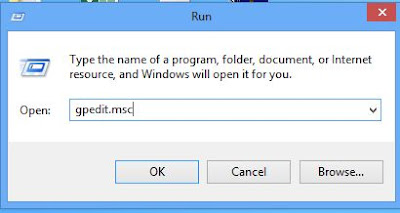
  • Press Windows + R button in your keyboard to launch the Run window
  • In the Run box type gpedit.msc to open the Local Group Policy Editor then hit OK

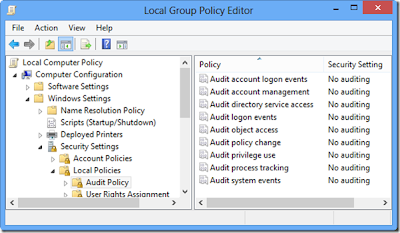
  • Now go to this path: Windows Settings > Security Settings > Local Policies > Audit Policy
  • Double Click the key Audit Logon Events


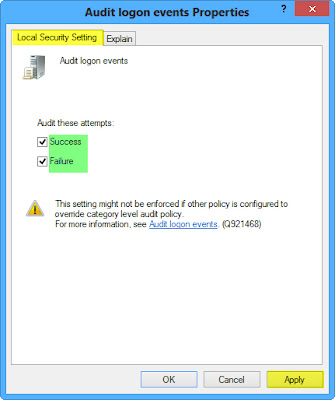
[] Now check the 2 checkboxes like below (Success: Will record only Sucess logons / Failure: Will record Failure logons ) then Click Apply and Ok.


[] Now to open the Event Viewer, just press Windows + W then Search for Event Viewer and launch that setting app. Then go to Windows Settings > Security to see the full Event Logs


#2- Hide up your Local Disk Drives in Windows 8


While hiding your storage disks from the Computer folder, no Hacker can access your personal files. This trick will allow you to hide your Local Disks from being saw in the Computer folder and protecting it and your sensible personal files from being hacked or penetrated by hackers. You can activate it in Windows 8 very easily as you follow this tutorial:

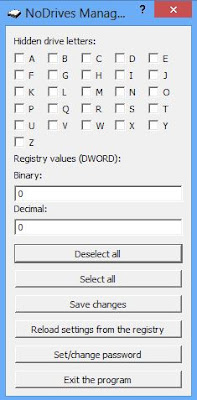
  • Download and Install NoDrives Managers
  • Launch NoDrives Manager from your Desktop
  • Now select the Drives to Hide then click Save Changes


#3- Clean up your Traces in Windows 8

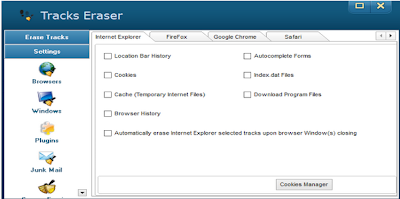
This trick will easily help you protect your self from being hacked if you use a Public PC. While using the internet your traces are being recorded in any Web Browser that you use, from URL you've visited, Accounts opened (Facebook, Twitter ...) to Cookies & Password saved, etc... To remove such a a huge data from your computer is little hard to do especially when you run out of time when using a Public Computer. You can do that effectively and easily with this Software that works well under Windows 8 operating system, here's how to use it:


  • Download and Install Anti Tracks
  • Launch Anti Tracks, then click Track Eraser button

  • Now you can use it to delete any traces that you left on your Windows 8 Computer.


#4- Auto Snapshot any Intruder in your Computer

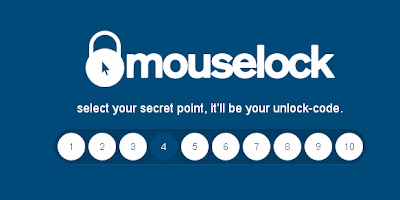
With this trick you'll be able to identify any person who tried to use your computer while you are away. How can you Identify him? This web based app will capture a snapshot using your computer's webcam of the person that tried to use your computer and send it to your email if he fail to enter the correct lock code. It's a very funny security trick that you can apply on your Windows 8 to keep it more secure and protected, here's How to enable it:

  • Go to MouseLock website
  • Click Signin with Google and login using your Google Account to accept the signin application.

  • Now select a number from 1 to 10 to be your Secret Code for unlocking this app.

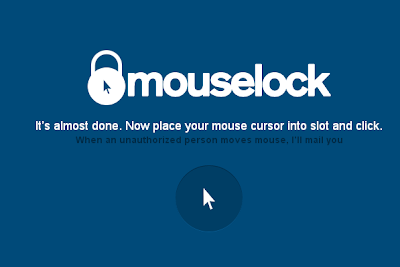
  • Now simply Place your Mouse pointer above the picture of the pointer to activate this app.
Now when someone just moves the mouse, it will ask him for the security code, if he fails to find it the app will secretly take a picture through webcam and send it immediately to your Email.
ON FINAL NOTE :: There Are A Lot Ways You Can Protect Your Windows But Finally RISK IS ALWAYS  THERE..!!!!


Sunday, 11 May 2014

The New Facebook Smartphone from HTC : Review

With a collaboration from HTC, Facebook have introduced their new unique Smartphone called Facebook Home, people are now waiting the release date of Facebook Home phone which is expected to be on 12th of April. The new Facebook phone by HTC will have a new integration layer containing all Facebook apps: Messenger, Facebook app, Video Chat... Here we are writing about the specifications and price of HTC First (Facebook Home) .

p.s** Even Some Apks Are Leaked On The Internet []

5 Easy-to-Use Professional Video Editing Software

http://d2vo5twcnd9mdi.cloudfront.net/uploads/021ebf26-24af-4b71-84c2-39fe9de25baa-director-chair.png
Video Editing Made Easy..!!1


Whether you are working to make a professional videos, or just trying to add awesome effects to your videos. When we talk about Video Editing we can say that almost programs are hard to use and take too much of time to learn, just like Adobe After Effects and Sony Vegas. So in this article you'll find the 5 most popular and Easy-to-Use Video Editing Software to add professional touches to your videos easily.


-------------------------------------------------------------------------------------------------------------

So Here We Go..!!!!!!!!!

   1. MAGIX Video Deluxe


 A very easy to use software to edit and add awesome visual effects to your videos is MAGIX Video deLuxe, just after installing it and exploring some settings you'll be familiarized with its interface, buttons and timeline usage. You can add multiple video effects, audio, images and videos. It supports a wide range of extensions especially .mov files.


   2. Ezvid Video Editor


It's true that Ezvid doesn't provide too much of effects to add, but it's the easiest to use. You can easily add Texts with cool fonts and styles, you can also add text slides and add audio streams to your videos. Another perfect option in Ezvid is that you can upload the video to Youtube directly from the program itself with one click.


       3. Pinnacle Studio

With over 1500 visual effects provided, Pinnacle Studio is a great way to professionally edit your videos in a very easy way. You can also create stunning 3D Stereoscopic videos and energize them with some other effects to make it ready to be a movie. You can also download the iPad version and import/export/edit your movies in a handheld device. The only negative of Pinnacle is price, because Pinnacle studio is a little expensive for normal users.
 

         4. Muvee Video Maker

 Another video maker is Muvee, if you want to make videos for Facebook, Youtube or Vimeo then you can use this software to create High Quality movies by adding some effects and slides. It's very easy to use and beginners can familiarize with its interface easily, and you'll be making fun with your videos.


        5. WeVideo


If you don't like to use the above programs, then you can their alternative Online Video Editor WeVideo. With WeVideo you have access to a large variety of effects, styles, slides, animations and texts that you can add to your videos just after uploading it in the dashboard of WeVideo.

-------------------------------------------------------------------------------------------------------------
Note** All Logos And Screenshots Are Property Of Their Respective Owners||


Friday, 31 January 2014

Bloomberg : Satya Nadella to be the Chairman Of Microsoft Gates May be Out!!!!

Reports say that Microsoft is considering Satya Nadella to step in as the company's new CEO after a months-long search. He has been near the top of the list of expected candidates to take Steve Ballmer's role, and nowBloomberg and other outlets report that he is likely the next to take the job. Microsoft spokesperson Frank Shaw declined to confirm or deny the reports, telling The Verge, "We are not commenting." Bloomberg's sources note that the decision has yet to be finalized, but he has "emerged as one of the stronger candidates" over the past few weeks. Dina Bass, the lead reporter on the Bloomberg article, says in a tweet: "Microsoft's board is preparing to name Satya Nadella CEO, sources tell us."
In addition, the report says that Microsoft's board is considering replacing founder Bill Gates as the company's chairman. Board member John Thompson is named as a possible replacement. Thompson recently revealed details about the company's CEO search, and he's said to have pushed Ballmer in the past to adapt more quickly to the competition.
As for the reported CEO replacement, Nadella is no stranger to Microsoft. He's been at the firm for over 20 years. He studied Electrical Engineering in India before he eventually moved to the states to study computer science. Before joining Microsoft, he worked at competitor Sun Microsystems until 1992. Once he arrived in Redmond, he worked on research at the company's online services division before rotating through a few different positions including working at times on Office and Bing. More recently, he's worked to realign Microsoft’s cloud services. Significantly, he has not been heavily involved with the company's consumer-facing products.
We're currently investigating these reports and will have more when we hear it. Ballmer first announced his plans to retire as CEO last August, setting off a search to find a replacement. No matter the final decision, we should find out soon: Kara Swisher's sources say that the choice could be announced sometime next week.
Update: The New York Times and The Wall Street Journal have weighed in with reports of their own both claiming that, while Nadella is said to be the preferred candidate, Microsoft's board is yet to make a final decision.
Source Bloomberg, Re/code, Dina Bass (Twitter)