Subscribe For Free Updates!

We'll not spam mate! We promise.

Showing posts with label abhishek. Show all posts

Tuesday, 9 September 2014

Apple's Special Event Today..!!!!

Apple-wall
THE LINK TO WATCH THE APPLE EVENT LIVE http://www.apple.com/live/
Updated: Sept. 9 at 8:55 a.m. ET By +Abhishek Gidde 
The sequence of events leading up to Apple's annual ritual of unveiling new iPhones is usually pretty rote. Rumors appear with increasing frequency, photos of product parts leak out and once the company finally gets around to actually unveiling the new products, we already know virtually all about them.
This time, however, things are different. Reports say the Sept. 9 Apple event will see the company enter a new product category. The iWatch — Apple's answer to the smartwatch and fitness tracker — will make its debut at the event, reports say, and we actually know very little about it.
LIVE BLOG: Follow Apple's iPhone Event Today
Sure, there have been leaks and rumors about the iWatch's software and abilities, insider speculation on how many versions there will be and various other scraps, but compared to the nonstop cavalcade of alleged iPhone 6 images, it's all pretty hazy.

Double down on iPhone

There's something else different about this iPhone unveiling. Like last year, we're supposedly going to see two new iPhones, but this time, neither one will be the "cheap" version.
Last year, Apple launched the iPhone 5S and 5C, but the C was really just a repackaged iPhone 5. It was new, but it was a step down.
Apple is expected to launch two new iPhones — both larger than the current one
This time, Apple is expected to launch two new iPhones — both larger than the current one and both state-of-the-art. The new sizes, based on alleged leaked parts, will be 4.7 and 5.5 inches. It appears that, similar to the iPad Air and iPad mini with Retina display, Apple will offer two products with the same internals and different screen sizes.

There will be more upgrades — a faster chip, increased resolution and improvements to the camera — but everyday users may benefit most from the phone's extremely durable sapphire glass covering the screen, one of the rumored new features. Apple has reportedly run into trouble producing the glass in the quantities it needs, though, so we might have to wait another year.
Rumors say Apple will call the 5.5-inch iPhone the "iPhone 6L." That's as good a name as any, although consumers will care more about how much it'll cost. It'll almost certainly be a step up from the 4.7-inch model, but $50 more or $100 more?
And let's not forget that iOS 8, first unveiled in June, will finally get its release date. If Apple sticks with its usual pattern, anyone with an iPhone 4S or later will be able to download iOS 8 on Sept. 17. Expect the complaints to begin about an hour later.

iWatch: the new category treatment

iWatch concept
THE CONCEPT OF i-Watch
It's remarkable that Apple has managed to keep most of its iWatch details a secret. It could be that Apple's curtain of secrecy was more effective for the iWatch since the product has a different supply chain than the iPhones, but that seems doubtful. More likely, as has been rumored, the iWatch will debut at a much later date than the iPhones, which almost always go on sale on the Friday of the week following the event — in this case, Sept. 19.
So why is Apple unveiling the iWatch now, if it's not going on sale for a few more months? A couple of reasons: First, the iWatch is a companion to the iPhone. Sure, Apple could wait for its October iPad unveiling to show us the iWatch (giving that event some needed sizzle), but it doesn't fit. The iWatch goes with the iPhone.

Also probably factoring into the decision: 

By unveiling the iWatch now, well ahead of the launch date, Apple can finally truly surprise. Just as with the original iPhone and iPad, we all knew generally what was coming, but we didn't know exactly. For a new product category, Apple always puts on a show, and by the choice of venue, it's clear Tim Cook and co. think they have something special.


So the iWatch is imitating the release pattern of its predecessors, but will it be as disruptive? The smartwatch category is certainly experiencing a boom, although it's still unclear if consumers really want them. The iWatch could be the product to take smartwatches mainstream, but to do that, it needs to do something that no other wearable does.
Rumors say the iWatch will have a curved-screen design, come in two sizes and have multi-day battery life. But based on early leaks of the software, its big differentiator will be the extensive sensor data that it gathers about the wearer's health.
At the iWatch unveiling, Apple will finally connect the dots between the iPhone, the Health app it showed at WWDC in June and wearable technology. The message on the iWatch will be balanced — it won't purely be about health for fear of being labeled a fitness tracker — but as far as what it'll offer over other wearables besides a great design and the ability to work seamlessly with an iPhone, the Health angle seems clear.

Point Of Convo..!!!!

Apple recently endured a black eye, as iCloud — rightly or wrongly — was implicated in the nude celebrity photo hack. In his remarks, Cook may take a minute or two to reaffirm his promise to improve security on the service.
Tuesday also marks the first public Apple event since the company closed its deal to buy Beats. While it's only been a month, so it's still a bit early for the first Beats project as an Apple company, we may see the beginnings of the collaboration — or at least an appearance by Dr. Dre.
Apple certainly could pack an iPod refresh, a release date for OS X Yosemite and maybe even new iPads (as one analyst has predicted) into its big show; but even if it does all that, those announcements will take their place in the background of the new iPhones and iWatch.
Sept. 9, 2014, will be remembered as the day when Apple finally released a phablet, and dove into wearables. One more thing is certain: It'll be the most interesting Apple event in years.

Friday, 8 August 2014

Samsung still the leader in the US

Samsung still the leader in the US mobile phone market: Counterpoint Research

Samsung still retains a 36 per cent share of the US smartphone market, latest data from Counterpoint Research shows.

It also led the overall US mobile phone market with a 37% share.

Thursday, 7 August 2014

iPhone 6 Is Here...!!! Get To Known IT...!!!!!!!!

Finally, according to the ever-more aligning rumor mill, Apple is set to launch the iPhone 6 on 9th September, which makes sense given its past record of release dates. This means all will be revealed in a month’s time.

So, nearly 8 months on, am I still excited and if so by what new features? Firstly it’s still not clear whether we’ll see both the suspected 4.7in and 5.5in models on launch day but I strongly suspect the larger ‘phablet’ model won’t be available from the outset. It’s likely to be hideously expensive and sales could well suffer as a result.
The iPhone 5C’s sales took a hit but for the opposite reason – the iPhone 5S wasn’t much more expensive so it made sense to opt for it instead. Likewise the 4.7in iPhone 6 already offers a larger screen so why go for something what many will feel is obtrusively large?
iphone 6

The proposed 4.7in and 5.5in versions of the iPhone 6

A larger screen

However, the larger screens are very welcome indeed for me and the 4.7in model is most likely the model I will eventually retire my iPhone 5 to own. This is for a number of reasons. Typing is more accurate for one – like it or not, a larger display means a larger keyboard that’s easier to use. I used a 4.7in Android-based smartphone recently and the difference the larger screen made to my iPhone 5 was immediately obvious when typing. I made fewer mistakes and could type faster too.
 The larger screen also makes viewing everything from websites to videos a much more immersive experience. You don’t have to pinch and zoom as often and setting your device down and watching videos often means plenty of squinting with the iPhone 5, unless you’re holding it to your face.
A wide display and form factor
While many iPhone 5/5s owners like the narrow screen and its ability to be operated fairly completely using just one hand, this aspect ratio doesn’t lend itself particularly well in other areas of ergonomics. The competition has had much wider, fuller screens for many generations and for the large-handed, the iPhone 5S can feel very small and not really up to the task of being a fully-featured smartphone. A wider display and handset could make it easier to use although it’s likely to put an end to one-handed use for most people.
4
The battery inside the iPhone 5 is usually depleted within a day of heavy use.

Better battery life

The battery in the 4.7in iPhone 6 is also looking likely to be a 2,100mAh model – a higher capacity than has been reported till now. This would mean it has over 45% more capacity over that in the iPhone 5S. Now, the screen in the iPhone 6 will undoubtedly be larger and draw more power as a result but the move from 4in to 4.7in will still mean there’s extra capacity here in addition to what will likely be be a more power-efficient processor.
Better battery life is always welcome in a smartphone and Apple’s devices have often languished at the bottom of the pile when it comes to time away from a charger. In fact, I’m actually hoping the renders and cases we’ve seen are actually not a true representation as they do appear exceptionally thin – I’d rather have a bigger battery if I’m honest. Even so, even a 10% increase in battery life would make the iPhone 6 much more competitive.
iOS 8
One reason why Apple has stuck with its screen size for so long is the success of its iOS operating system. Introduced with the original iPhone, it nailed things design-wise at a time when the competition were still using styluses or had horrid touch screens. Now, though, who doesn’t have capacitive touch screens and large app icons?
iOS 8 could represent the biggest shift in OS design since that initial launch, as Apple has to deal with the larger screen real-estate and make all our favourite features work just as well as they do on an iPhone 5S. While iOS obviously runs well on both sizes of iPad, a smartphone puts the magnifying glass on this much more intently. It will be particularly interesting to see how things flow on the larger iPhone 6 too.


Friday, 4 July 2014

How To Convert Song To Ringtone (Android)

Wanna set your favourite song
 as your ringtone here it is ...!!!!!!


- First Download Ringdroid from playstore :- First Download Ringdroid from playstore :Here
- Open it and add the song that you want make it as Ringtone.
- Click on it. This will break the song.Now choose the part of area in song that you want to use it as ringtone.
- Click the Disk icon to Save it.Now a window will popup asking you to whether Save this a Default Ringtone to your Phone or for Specific Contact.
Choose your favorable and that’s it you are Done!
- Open it and add the song that you want make it as Ringtone.
- Click on it. This will break the song.Now choose the part of area in song that you want to use it as ringtone.
- Click the Disk icon to Save it.Now a window will popup asking you to whether Save this a Default Ringtone to your Phone or for Specific Contact.
Choose your favorable and that’s it you are Done!

Tuesday, 13 May 2014

Windows 8 Security Tips : Protect Your New Windows 8

Whether in Work or Home, sometimes you need to protect your PC running Windows 8 from being hacked or used by someone else. It's truly hard to do that while you are away from your Computer, but it's easy to apply some security tricks to your Windows 8 and feel safe & secure while you are not in front of your computer. Here is a List of Top Windows 8 Security Tricks that you have to apply to your computer in order to make it more protected.

#1- Know Who Used your Computer


With this trick you are able to know who used your computer in your absence. Event Viewer is a built in Windows feature also available on Windows 8, the Event Log is able to record any Login that happened on your computer with saving the Time and Date of the Login and the Session that have been opened. You'll also be able to reveal who tried to access your user account (wrong password entered). Here's the tutorial on How to see the Event Log on Windows 8. 
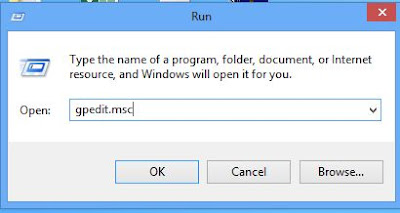
  • Press Windows + R button in your keyboard to launch the Run window
  • In the Run box type gpedit.msc to open the Local Group Policy Editor then hit OK

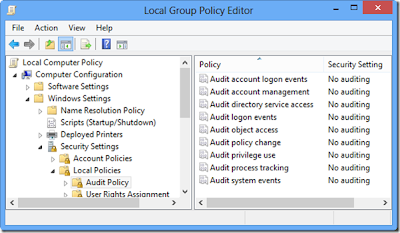
  • Now go to this path: Windows Settings > Security Settings > Local Policies > Audit Policy
  • Double Click the key Audit Logon Events


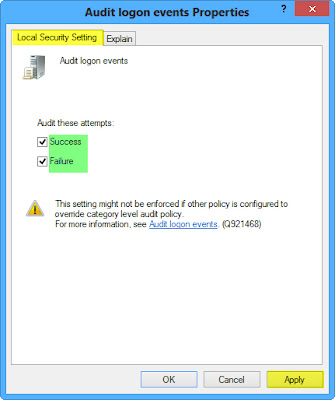
[] Now check the 2 checkboxes like below (Success: Will record only Sucess logons / Failure: Will record Failure logons ) then Click Apply and Ok.


[] Now to open the Event Viewer, just press Windows + W then Search for Event Viewer and launch that setting app. Then go to Windows Settings > Security to see the full Event Logs


#2- Hide up your Local Disk Drives in Windows 8


While hiding your storage disks from the Computer folder, no Hacker can access your personal files. This trick will allow you to hide your Local Disks from being saw in the Computer folder and protecting it and your sensible personal files from being hacked or penetrated by hackers. You can activate it in Windows 8 very easily as you follow this tutorial:

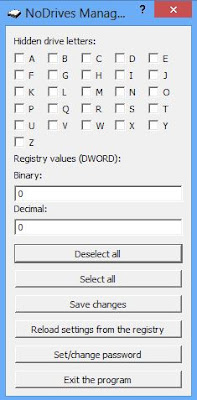
  • Download and Install NoDrives Managers
  • Launch NoDrives Manager from your Desktop
  • Now select the Drives to Hide then click Save Changes


#3- Clean up your Traces in Windows 8

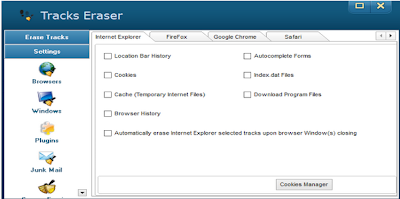
This trick will easily help you protect your self from being hacked if you use a Public PC. While using the internet your traces are being recorded in any Web Browser that you use, from URL you've visited, Accounts opened (Facebook, Twitter ...) to Cookies & Password saved, etc... To remove such a a huge data from your computer is little hard to do especially when you run out of time when using a Public Computer. You can do that effectively and easily with this Software that works well under Windows 8 operating system, here's how to use it:


  • Download and Install Anti Tracks
  • Launch Anti Tracks, then click Track Eraser button

  • Now you can use it to delete any traces that you left on your Windows 8 Computer.


#4- Auto Snapshot any Intruder in your Computer

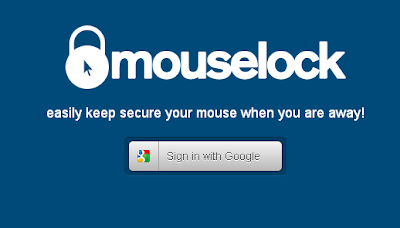
With this trick you'll be able to identify any person who tried to use your computer while you are away. How can you Identify him? This web based app will capture a snapshot using your computer's webcam of the person that tried to use your computer and send it to your email if he fail to enter the correct lock code. It's a very funny security trick that you can apply on your Windows 8 to keep it more secure and protected, here's How to enable it:

  • Go to MouseLock website
  • Click Signin with Google and login using your Google Account to accept the signin application.

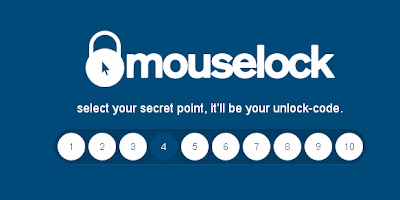
  • Now select a number from 1 to 10 to be your Secret Code for unlocking this app.

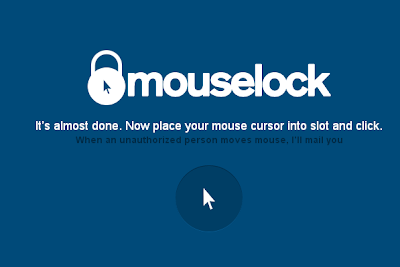
  • Now simply Place your Mouse pointer above the picture of the pointer to activate this app.
Now when someone just moves the mouse, it will ask him for the security code, if he fails to find it the app will secretly take a picture through webcam and send it immediately to your Email.
ON FINAL NOTE :: There Are A Lot Ways You Can Protect Your Windows But Finally RISK IS ALWAYS  THERE..!!!!


Saturday, 26 October 2013

Top PS4 Games.......

Destiny:

Destiny_poster_550x367 

Destiny is the name of the next project from Bungie, the studio that originally created Halo. Destiny is the ambitious successor to Halo. Bungie has confirmed that Destiny is headed to Sony’s new console. The news comes from Sony’s live event in New York City and comes just days after Destiny initial reveal for PS3.Unlike the exclusive Microsoft franchise, Destiny is being published by Activision. 

Knack:

Turn into a gigantic fighting machine thanks to the power of ancient relics in this new adventure platforming game. Mankind enlists the help of an unlikely hero named Knack to protect them from a dangerous new threat in this fun-filled and action-packed adventure set in a unique and vibrant world.


DriveClub:

Drive Club from Evolution Stuios focuses on team play and racing in clubs around the world. It will support challenge integration via phone. This is definitely one of the most intriguing titles so far announced for Playstation 4.


LAUNCH STATUS: CONFIRMED — DriveClub senior environment artist Jeremy Miller mentions on his Linkedin profile the game is “PlayStation 4 launch title.”

:::: AND THE MOST AWAITED ONE:::

Killzone Shadow Fall:

Without doubt the number one game seen on the PLaystation 4 is Killzone Shadow Fall. This is the one game that truly showed off the power of Playstation 4. While I personally have to fault the fact that the gameplay looks precisely the same as every other shooter in the universe, the sheer beauty of the graphics are enough to shut me up. This is Eye Candy +1. Tasty!

Killzone_550x367


The Witness:

The Witness: The latest puzzle game from Jonathan Blow, creator of Braid. Explore an abandoned island and solve the puzzles you find there. What is this mysterious place, what happened here in the past and what is happening now? LAUNCH TITLE STATUS: UNCONFIRMED — This is Sony’s flagship downloadable indie title. It’s a timed PlayStation 4 exclusive. So although unconfirmed it’s very likely Sony will want to release this game at launch.
0 Complete PS4 Gameplay & Video Compilation 

InFAMOUS: Second Son:

The trailer for Infamous Second Sun was pretty stupid. Sucker Punch desperately tried to stir drama by asking what would happen if people with superpowers suddenly revealed themselves in a world of over-surveillance. . . which, to be fair, is a pretty random question to ask.   InFamous Second Son will be a Playstation 4 exclusive

0 Complete PS4 Gameplay & Video Compilation


Watch Dogs

The footage Ubisoft showed of Watch Dogs for Playstation 4 might have been near identical to what they showed at E3 last year, but it still makes for a highly interesting prospect.    Watch Dogs advocated invasion of privacy in an open world
LAUNCH: CONFIRMED — Following the announcement of the PlayStation 4, Ubisoft revealed that its highly anticipated open world action-adventure game, Watch Dogs, will be available for the launch of the new console system.
0 Complete PS4 Gameplay & Video Compilation 

Final Fantasy

Shinji Hashimoto announced that a new Final Fantasy would be released on PLaystation 4. Will this be the brilliant kind of Final Fantasy from years ago, or the new and utterly rubbish type of Final Fantasy? Time will tell. Expect it by 2023 ! Although the 2023 release date is a half-joke, it’s not really funny how long Square Enix takes to release Final Fantasy games these days, so it is most definitely not coming for a few years. This way it might be a pleasant 2014-2015 surprise if you’re not waiting for it.


Deep Down (working title):

Capcom’s brand new IP is still shrouded in mystery, is it Monster Hunter meets Dark Souls? Only time will tell. Known only under its working title of “Deep Down”, the dragon-fighting knightin the teaser shows off a brand new game engine codenamed “Panta Rhei.”
Deepdown_550x367 


LAUNCH TITLE STATUS: UNCONFIRMED — Capcom promised further details in the coming months. Expect a gameplay reveal and release date at the E3 2013 Capcom event in June.
So what do you guys think? Are you excited for the PS4 and its games, or will you wait to hear about the Xbox 720 before making a decision? till then enjoy reading about New/Upcoming  games reviews, updates and news  here.
All PS4 Games With Trailers          >>>>>>>>>>>>>>>Author: Abhishek C. Gidde<<<<<<<<<<<<<<<<<<<<<<<<<<

Sunday, 15 September 2013

7 Awesome Cloud Apps....

Good software is expensive, right? Wrong! If you have access to a decent internet connection, you can access some truly fantastic services on the internet for FREE.

1) PREZI

If you've ever been jealous of colleagues because of their fantastic slide-shows , then Prezi gives you a chance to go one-up on them. This online service lets you create animated presentations, where words, images and videos work together to present an idea in a virtual 3D space (you have to actually see this to believe it).

Sign up for a free account, and you are given 100MB of storage. Creating a dynamic presentation is simple. You can choose from the myriad templates -and then, simply go with the flow: adding words, photos, audio narrations and videos. Since this whole service is on the web, you can directly insert YouTube clips and even images from the internet. Prezi is simple to learn; you'll be adding slides, images, and changing colour themes in no time.

It should be noted that with a free account, all your presentations will be open to the public to view. Sign up for a paid package, and you get up to 2GB of storage; you can keep your presentations private; and if you sign up for a Pro account, you can also download the Prezi Desktop software that lets you work offline without an internet connection. The best part, you can even create an online bio data or portfolio on this site to share with prospective clients over the internet.

prezi.com

2) SOUNDATION

Pro music software - complete with loops, aural effects, virtual instruments, et al - can cost a pretty packet. And till recently, only professional musicians could afford such an investment. Soundation, however, is all about the democratisation of the music-making process.

Sign up for a free account and you are given 100MB storage, your own powerful online studio with its mixers and effects, and over 700 loops and sounds. And although it's free, you still get all the functionality of a professional Digital Audio Workstation.

Sign up for a paid account, and you get access to a premium library of sound files and instruments and up to 5GB of storage. Here, you can even record audio via your microphone, and upload the WAV file to Soundation servers to use in your mix.

And in case you're wondering, Soundation comprises a detailed set of how-tos that will help you understand all the nuances of the software, even if it's your first attempt. Besides, it has an active community where you can post your compositions for others to listen to and comment.

soundation.com

3) PICFULL

So you want to post professional quality holiday photos to your Facebook and Flickr account, but cannot because you don't know how to use imageediting software. Picfull to the rescue. This free cloud-based service provides a simple web interface that allows you to apply over 20 photo effects - each one with sliders and colour palettes -to edit your snapshot.

Simply browse your PC's hard drive to upload the image you want to edit; choose the filter you want to apply; play around with the sliders that appear till you get the effect you desire; and hit Save. You are given a link to download your edited photo, or the option to directly email it to friends, or share on Facebook and Twitter.

picfull.com

4) PRIMADESK

Given the number of online services and social networks available today for storing photographs, emails, and documents, keeping a check on all of them has become quite a bother. Backing up this data on the cloud is a bigger hassle. Try Primadesk.

A free account provides you with 1GB storage and lets you manage up to five online services (Flickr, Dropbox, Yahoo!, Gmail, Google Drive, Evernote, Photobucket, Twitter, Facebook, MySpace, etc).

Alternatively, you could opt for a Pro or Premium account that lets you manage more than five accounts - and provides you with up to 30GB of space.

Figuring Primadesk is quite simple - it splits your accounts into documents, e-mail and photos. And like Windows Explorer, you also get the familiar folder pane that makes it easy to transfer or copy files from one service to the other. The backup process is also intuitive, and requires a one-time setup only.

primadesk.com

5) CONVERT FILES

Content - whether its images, audio or video - comes in different formats. You have AAC, WAV, MP3, OGG, M4A, FLAC, AU, WMA, AMR... and this is in audio only. Some MP3 players, for instance, might not support FLAC. Or your Smart TV might not support FLV and MKV. In such cases, your only option is to convert the files to a format that's supported. But to do this, you no longer need to download any special software. Head to Convert Files - a service that lets you convert audio, video, image, document, presentation and archive file types to the data format of your needs. At last count, CF supported 335 possible conversions - and it's frequently adding more formats and combinations.

Simply upload a file (max size: 250MB), and then from a dropdown menu, choose the format into which you want it to be converted. CF does all the dirty processing on its servers, to provide you with a link from where you can download your converted file.

Uploaded files are destroyed immediately after being converted - and output files are kept on CF's servers for 24 hours only.

Interestingly, you can also provide video links from YouTube, MetaCafe, MegaVideo, DailyMotion and Vimeo, and CF will create a downloadable video file for you. Even better, you can choose to extract the audio from the video file and convert it into a format like MP3.

convertfiles.com

6) NETVIBES

Trying to keep tabs on current affairs - visiting each and every bookmark you have saved on your PC -can be quite a task, especially if you have to open a new browser window for each resource.

But it doesn't have to be so cumbersome. With Netvibes you can eliminate all this clutter. Simply add the websites you follow into the service by providing their RSS links to generate widgets for each entry.

Furthermore, you can create tabs within this service and sort news widgets according to verticals like technology, sports, business, etc.

Since Netvibes is cloud-based , you can check your feeds from any PC by logging in with your ID. Each tab's layout can be tweaked and you also get the added option of hosting a public page with news widgets of your choice - it's like a news bulletin curated by you.

What we really like, however, is that you can also add your Facebook account, Twitter, and e-mail addresses, putting multiple sources of information right at your finger tips.

netvibes.com

7) IFTTT

Are you getting fed up of backing up your Instagram photos to Flickr and Dropbox every week? And would you prefer an easier way to post your Foursquare check-ins to LinkedIn without having to do it manually? If yes, then IFTTT (If This Then That) is the answer to your web woes. It is a resource that lets you automate a whole bunch of online tasks, saving you loads of time.

First you need to activate the services you use -Picasa, Google Drive, Flickr, Instagram, etc - before you browse through the treasure trove of readymade actions. For instance, you could choose one that downloads and backs up Facebook photos you have been tagged in to Dropbox. All you need to do is activate the Facebook and Dropbox service within IFTTT and activate the task. You can edit these tasks or create new ones altogether. Don't forget to share them so others can also benefit from your nifty shortcuts.

ifttt.com

COMPOSED BY ; Abhishek C. Gidde
*TECHTONIC